
Hotwatch, a small and fast system monitor in Go
One native window for my laptop, my GPU box and my VPS, with a tiny agent for remote servers and their Docker containers.
 Le Tran Minh DatAI-Native Software Engineer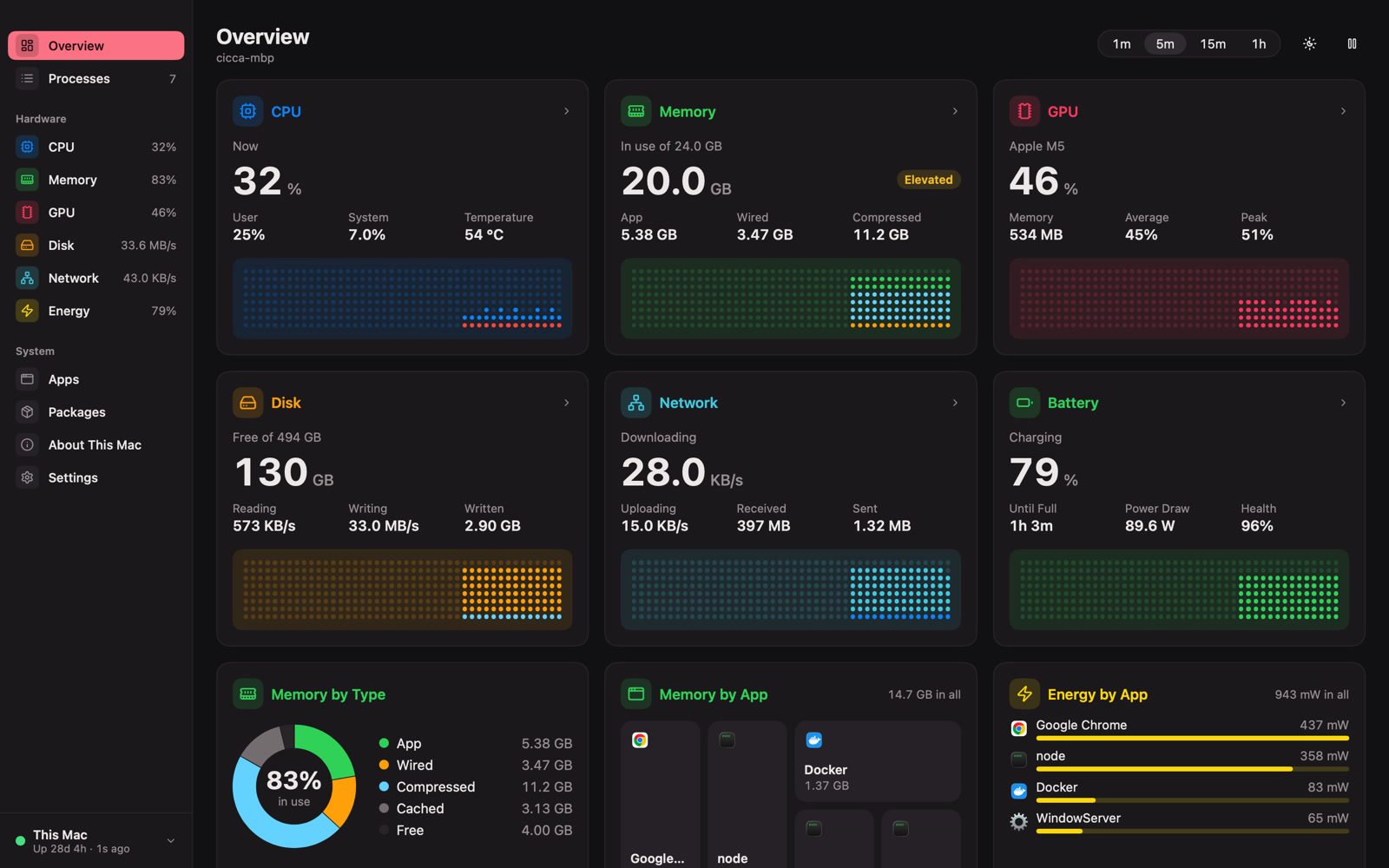
On this page
Why I built it
I look after a MacBook, a GPU workstation for builds and heavy jobs, and a VPS that runs Docker containers. Checking on all three meant three terminals and an SSH session I had to remember to open.
I wanted one place to glance at all of them. It had to be native, start instantly, and stay light enough that leaving it open costs nothing. That became Hotwatch.
What it does
Hotwatch shows what a machine is doing in one window: CPU, memory, disk, network, GPU, battery and every process. The Overview is a grid of cards with live charts. Click a card and you get the full page.
Some of the pages:
- CPU: user and system time, per-core bars with performance and efficiency cores shown apart, temperature, load averages and the busiest apps.
- Memory: app, wired, compressed and cached memory counted the way Activity Monitor counts them, plus pressure and swap.
- Processes: a fast table with search, a tree view, a detail panel, and terminate or force quit.
- Docker (remote hosts): containers with state, health and usage. You can start, stop and restart them and follow their logs live.
On MacBooks with a notch, CPU and memory sit right next to it. Rest the pointer on the notch and a small island drops down with the essentials.
The same window works for remote hosts. A host switcher at the bottom of the sidebar moves between This Mac, the GPU box and the VPS, and every page shows that host's data.
How it is built
Hotwatch is two programs that share one Go module.
The app (cmd/hotwatch) is built on mygo, a pure-Go toolkit that draws its own native UI. There is no Electron, no web view and no cgo, and Go is the only thing you need to build it. The same code builds a signed .app and .dmg on macOS, an .exe on Windows, and a .deb and tarball on Linux.
The agent (cmd/hotwatch-agent) is a single static binary for remote hosts. It runs under systemd on Linux or as a Windows service, and serves a small JSON API under /v1: info, snapshot, processes, containers, logs, plus a few action routes.
Between them sits one interface. A local host and a remote host both implement Source, so the rest of the app doesn't care where the data comes from:
type Source interface {
    Info(ctx context.Context) (model.HostInfo, error)
    Snapshot(ctx context.Context) (model.Snapshot, error)
    Processes(ctx context.Context) ([]model.Process, error)
    Signal(ctx context.Context, pid int32, start time.Time, sig model.Signal) error
    Containers(ctx context.Context) ([]model.Container, error)
    ContainerAction(ctx context.Context, id string, act model.ContainerAction) error
    ContainerLogs(ctx context.Context, id string, tail int, follow bool) (<-chan model.LogLine, error)
}
A hub runs one poller per host. It keeps ten minutes of history in ring buffers and tracks each connection through a small state machine: connecting, online, stale, offline with backoff, or a hard stop for a rejected token, a changed SSH host key or an incompatible agent version. When a host drops, its last data stays on screen with its age instead of turning into zeros.
I chose polling over a push stream. The app asks for a snapshot each interval over a kept-alive connection; only container logs stream. A missed poll is how an offline host shows up, and the agent stops sampling when nobody has asked for a while.
The remote agent and security
The agent never listens on a public address. You pick one of two modes when you install it:
- Tailscale: it binds to the host's Tailscale IP only.
- SSH: it binds to
127.0.0.1, and the app reaches it through an SSH tunnel using your existing key or ssh-agent. Host keys are checked strictly, and a changed key stops the connection.
Any other listen address is refused, and there is no flag to override that. Each request carries a per-host token. The agent stores only its SHA-256 hash, and the app keeps the token in the system's secret store. An agent can also run read-only, so every action that changes something is rejected.
The systemd unit runs the agent as its own user and gives it only CAP_KILL, which it needs to end other users' processes:
NoNewPrivileges=yes
ProtectSystem=strict
ProtectHome=read-only
AmbientCapabilities=CAP_KILL
CapabilityBoundingSet=CAP_KILL
Docker needs nothing extra. If the agent's user can reach the Docker socket (or Docker's named pipe on Windows), the Docker page appears.
What was hard
Never killing the wrong process. PIDs get reused. If you see a process, click Terminate, and it has exited in the meantime, a naive monitor could signal whatever new process got that PID. In Hotwatch a process is identified by its PID and its start time. The agent checks the start time before sending the signal and returns a conflict if it differs. On Linux it goes one step further: it opens a pidfd first and re-checks through it, so the signal goes exactly to the process it was meant for.
Making it actually light. The process scan on macOS started on gopsutil, which was fine for a first version. Profiling later showed it reopening system libraries for every process, so I replaced it with one kern.proc.all sysctl plus two calls per process. That took a scan from about 11 ms to under 2 ms. Temperature reads now happen every five seconds, because one read can block for tens of milliseconds. When the main window is hidden, the app polls only what the notch needs and skips process scans.
Windows. Windows came later, and it brought its own security work. Docker on Windows talks over a named pipe, and any user can create a pipe with that name while Docker is down. The agent now checks who is serving the pipe and trusts it only if that is SYSTEM or one of Docker's own programs.
What isn't done. The agent on a small VPS still uses more CPU than I'd like. Windows and Linux support passes tests and CI, but I haven't used it day to day on a real PC or Linux desktop yet.
Stack
- Go 1.27, no cgo (
CGO_ENABLED=0) - mygo for the native UI and for packaging (
.app/.dmg,.exe,.deb) - purego for calling macOS frameworks (IOKit for the GPU, battery and sensors) without cgo
- gopsutil v4 as the portable collector for Windows and the BSDs
- golang.org/x/crypto/ssh for SSH tunnels, golang.org/x/sys for pidfd and OS calls
- go-winio for Docker's named pipe on Windows
- Docker Engine API over its socket or named pipe;
nvidia-smifor NVIDIA GPUs - GitHub Actions running tests on Ubuntu, macOS and Windows Server 2022 and 2025, plus cross-builds for FreeBSD and ARM
Hotwatch is MIT licensed. The code is at github.com/letranminhdat1516/hotwatch.
- go
- monitoring
- desktop
- docker